
Open Settings App > Connections > Wi-Fi Calling
Make sure Wi-Fi Calling is turned on.
Make sure Wi-Fi Calling is turned on.
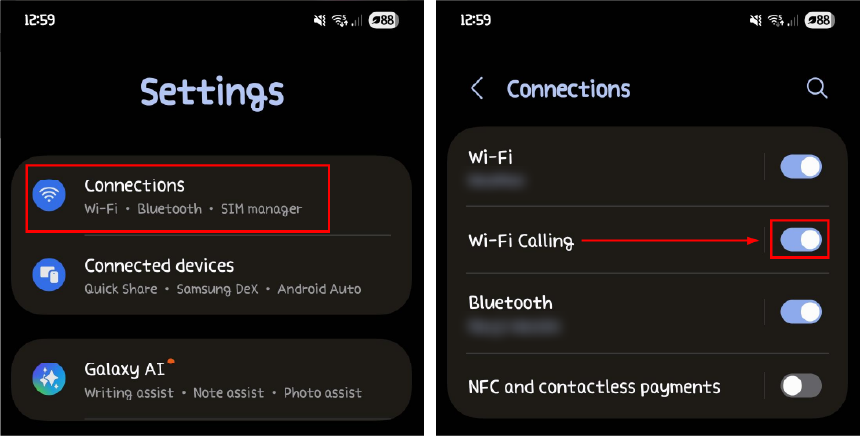
- If you see a direct Wi-Fi calling option, select it.
- Alternatively, tap on "Internet" or "SIMs" or "SIM card" settings and look for Wi-Fi calling there.
- Some phones may require you to go into "Calls" and then find the Wi-Fi calling option.
- Check with your carrier: Ensure that your mobile carrier supports Wi-Fi calling.
Use the search bar: If you can't find the setting, use the search bar at the top of the Settings app and search for "Wi-Fi Calling". - Confirm your connection: Make sure your phone is connected to a Wi-Fi network, which is indicated by the Wi-Fi signal in your status bar.
- Test the feature: Enable airplane mode, then turn Wi-Fi back on and try making a call to see if it works over Wi-Fi.